iTunes Duplicate Finder
Get an effective iTunes Duplicate Rmover to find and clean up your iTunes duplicates files
 Download Now
 Compatible with Windows
11/10/8.1/8/7 (Both 32 & 64 Bit)
Get an effective iTunes Duplicate Rmover to find and clean up your iTunes duplicates files
Download Now Compatible with Windows
11/10/8.1/8/7 (Both 32 & 64 Bit)
iTunes Duplicates Finder is an easy to use iTunes duplicates removing tool for cleaning duplicated tracks in iTunes Library. It can help you find duplicate song according to various pre-defined conditions automatically and sort duplicates into groups
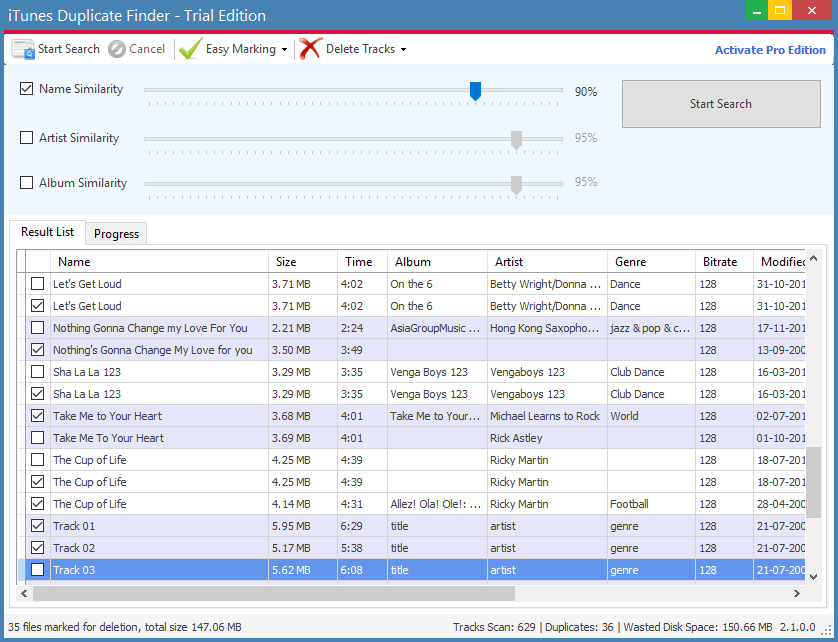
Having duplicate music files on your computer causes more problems than just annoying the user. Duplicate songs can take up valuable hard drive space and bog down your computer speed! Many people don't think about how much having multiple copies of songs can really affect your system.
Whether you've downloaded music or imported songs from CDs, you may have a few duplicate tracks causing clutter in your iTunes music collection. iTunes Duplicate Finder is designed to find and delete duplicate songs or tracks in your music library. Not only it finds them but it also allows you to safely remove them, thereby reclaiming space on your hard disk. It will find and clean duplicate music in your iTunes library.
P.S: Duplicate songs in your iTunes Library can be a pain, but they can be taken care of with a little patience and know-how. Whether or not you use iTunes to manage your duplicates or an alternate option, you should always exercise caution before deleting your music.
Download Now Compatible with Windows
11/10/8.1/8/7 (Both 32 & 64 Bit)